2×2 Passport Photo Maker (US Passport & Visa)
Frame a 2×2 inch photo with a 1–1⅜ inch head, then download a 600×600 visa file or a sheet of six prints.
or drag and drop your photo here
No image? Try one of these:
 Portrait Photo
- Face the camera, neutral expression
- Even light, no shadows
- Plain light wall behind you
How to use
- 1Take a photo against a plain white wall, without glasses, in even light.
- 2Upload it; the US 2×2 size is already selected.
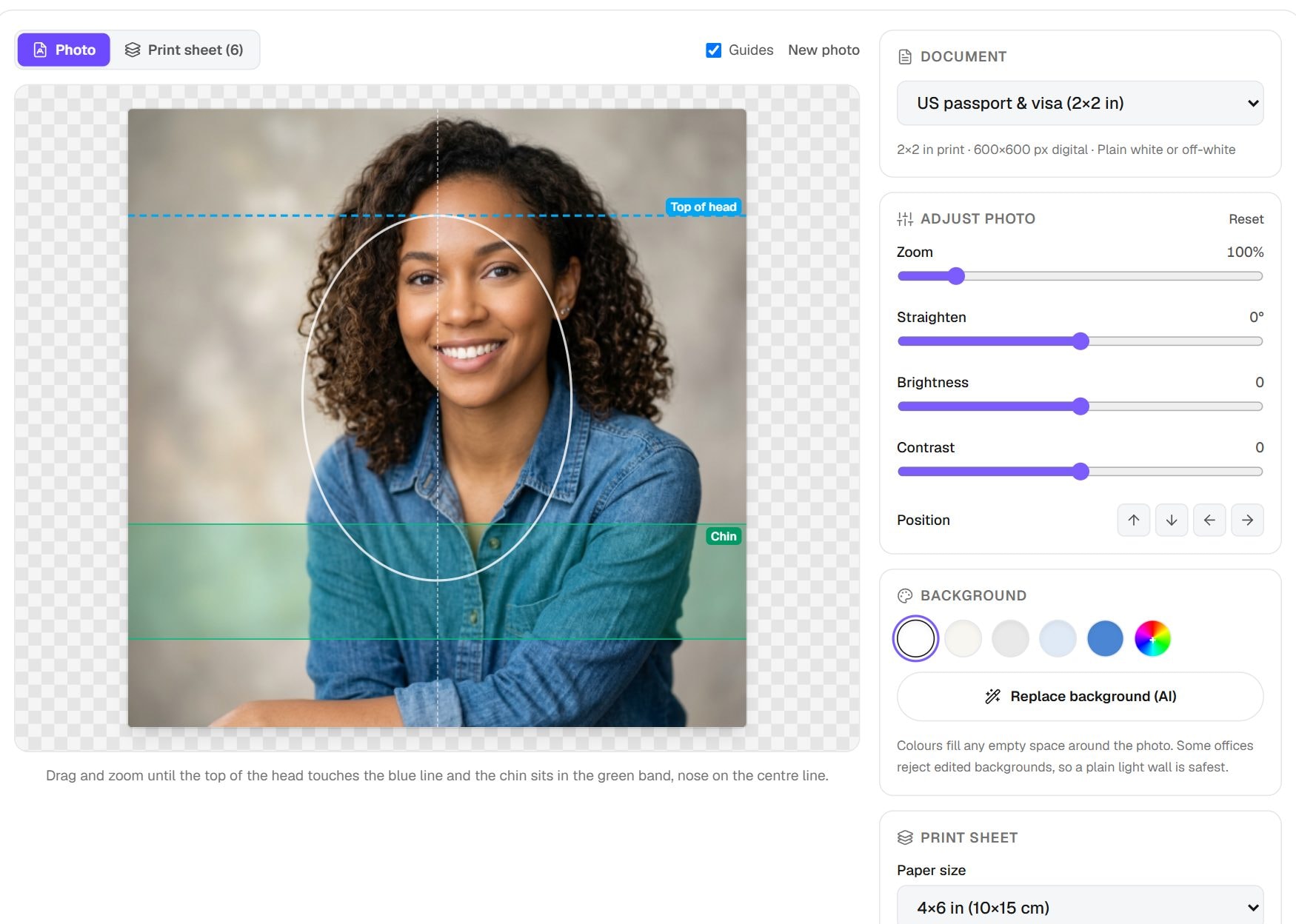
- 3Align the top of your head with the blue line and your chin inside the green band.
- 4Download the 600×600 JPG for visa forms, or the 4×6 sheet to print.
- 5Print the sheet at 100% scale, then cut two 2×2 photos along the lines.
Privacy: Cropping, sizing and the print sheet are made in your browser. Your photo is only sent to our server if you choose the AI background option. The server deletes the upload within an hour and the result within six hours.
What this tool does
A US passport photo is a 2×2 inch square, and the head inside it must measure 1 to 1⅜ inches from chin to top of head. This tool puts those measurements on screen as guides, so you can move and zoom your photo until it fits. Then download a 600×600 pixel JPG for online use, or a 4×6 sheet of six photos to print at a pharmacy or at home.
The US rule is unusual because the photo is square. Most other countries use 35×45 mm, so a US photo cannot be reused for them. Need one of those? The Passport Photo Maker covers other countries, and the Schengen Visa Photo page is set up for European visas.
When you'd use it
- Passport application or renewal. Print the sheet at 4×6, then cut two photos to attach to your form.
- US visa application. Visa uploads use the 600×600 pixel square, and the file must stay under the 240 KB cap the tool aims for.
- Saving money on prints. A 4×6 print at a photo counter is usually cheaper than a passport photo service, and it gives you six copies.
- Trying a few takes. Because nothing is uploaded and there is no charge, you can try several pictures before choosing one to print.
How it works
Passport rules measure your head as a share of the photo. On a 2 inch photo, 1 to 1⅜ inches works out to about 50% to 69% of the height, and the guide is drawn at that range. You line up your chin and the crown of your head with it, ignoring your hair.
On download, the tool draws the frame at 600×600 pixels and encodes a JPG. For the sheet, it repeats the photo at real physical size on a 1800×1200 pixel canvas, which prints as 4×6 inches at 300 DPI. These steps run in your browser. Only the optional AI background replacement uses our server, where your picture is removed after an hour at most and the output after six hours at most.
Real results from our tests
From our sample portrait, the digital file came out at 600×600 pixels and 79 KB, well under the 240 KB visa cap. The print sheet was 630 KB as a JPG and 633 KB as a PDF, so either is easy to email to a print shop. Pixel sizes stay fixed for any photo; file sizes depend on detail.
| Output | Pixels | File size |
|---|---|---|
| Digital photo | 600×600 | 79 KB |
| Print sheet, JPG | 1800×1200 | 630 KB |
| Print sheet, PDF | – | 633 KB |
Input: our 1024×1024 sample portrait, default framing. Measured by running this tool in Chrome on 6 November 2026. Your files will give different numbers.
Tips and common mistakes
- Do not wear glasses. The State Department does not accept them in new photos, except in rare medical cases with a doctor's note.
- Use a plain white or off-white wall, and stand a step or two away from it to avoid a shadow.
- Print at 100% or Actual size, then measure a photo with a ruler. It should be exactly 2 inches wide.
- Use a photo from the last six months that looks like you do now.
- Keep your expression neutral or give a natural smile, with both eyes open and your face square to the camera.
Limits
- Acceptance is up to the State Department, not this tool. Read the current photo rules before you submit.
- The guides check framing only. They cannot judge shadows, glare or whether your expression is acceptable.
- Print quality depends on your printer and paper. Photo paper at a lab usually beats plain paper at home.
- Online passport renewal has its own upload process, so follow its instructions for the file it wants.
Frequently asked questions
- What size is a US passport photo?
- 2×2 inches, with the head measuring 1 to 1⅜ inches from chin to top of head. The digital version is a square of at least 600×600 pixels.
- Can I print the photo at home?
- Yes, if your printer handles photo paper well. Print the 4×6 sheet at 100% scale. If the colour or sharpness looks poor, send the same file to a pharmacy photo counter.
- Why is my head too small inside the guide?
- Your original was probably taken from too far away. Zoom in until your chin and crown meet the guide lines. If the picture turns soft when you do that, retake it closer.
- Does the tool remove my background?
- Only if you choose the AI option, which uses our server. If your wall is already plain white or off-white, you do not need it, and nothing leaves your device.
- Can I use this photo for a passport from another country?
- Usually not, since most countries use 35×45 mm with different head rules. Use the Passport Photo Maker and choose your country.
Maintained by Hardik Sindhav · Last verified 6 November 2026 · How we test and use AI
Want the details? How to take and print a 2x2 passport photo at home, plus the ICAO 35×45 mm size other countries use