Free Video Thumbnail Generator
Pick the best frame, add a headline and export a thumbnail at the right size. Nothing is uploaded.
or drag and drop your video here
No video? Try a sample:
How to use
- 1Upload your video and wait a few seconds for the candidate frames.
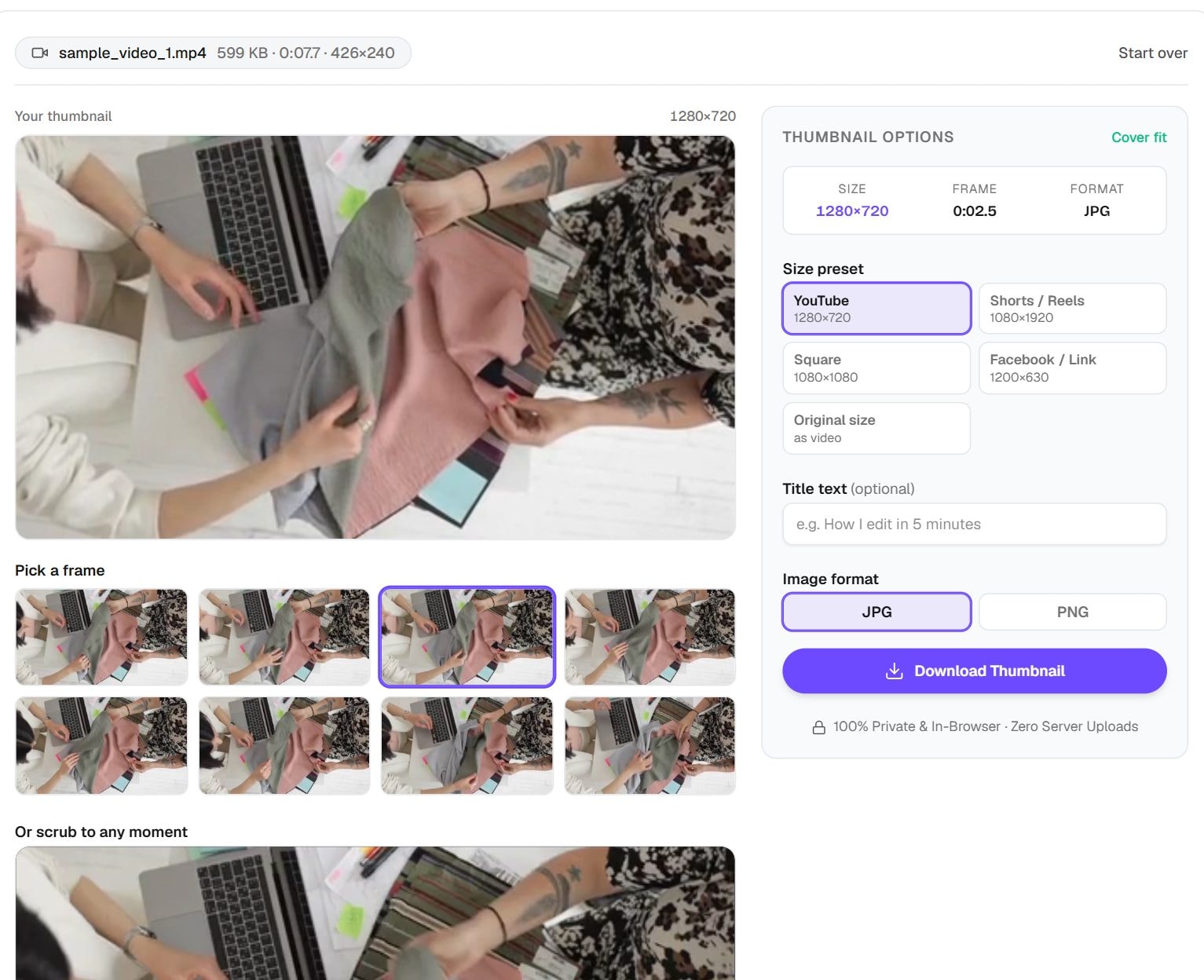
- 2Click a candidate, or scrub the player and press Use this frame.
- 3Choose a size preset and add headline text if you like.
- 4Pick JPG or PNG and download the thumbnail.
Privacy: Everything runs in your browser. Your video and thumbnail are never uploaded.
What this tool does
This tool makes a thumbnail from your video without a design app. It suggests a set of frames, or you can scrub to any moment you like. Add a headline in bold outlined text, choose a size such as YouTube 1280×720, Shorts 1080×1920, square or a 1200×630 link preview, and download a JPG or PNG. The video stays on your device throughout.
To save frames exactly as they are, with no text and at the video's own size, the Video to JPG tool is simpler and can pull many at once. And if you already have an image and only need to fit it to YouTube's rules, use the YouTube Thumbnail Resizer instead.
When you'd use it
- A YouTube custom thumbnail. Pick a frame where a face shows a clear expression, then add a short headline.
- Shorts and Reels covers. The vertical size keeps your subject in frame when viewers see it in a tall feed.
- Link previews. The 1200×630 size suits the preview card that appears when you share a video link on social media or chat.
- Client or course videos. Consistent covers are quick to make, even when you are only working from the finished video file.
How it works
When you open a video, the tool seeks through it and captures a few frames for you to choose from, which saves a lot of scrubbing. Picking a frame draws it onto a canvas at the size you selected. If the frame's shape differs from the size, it fills the shape by cropping from the centre.
Your headline is then drawn on top in heavy system font lettering, scaled to the image height, with a dark outline so that it stays readable on any frame. All of this uses your browser's own video decoder and canvas. The source video can be any format your browser plays, and only the finished image gets saved.
Real results from our tests
Frames came from our short sample clip with no headline added. JPG is the clear choice here: the YouTube size was 131 KB as a JPG and 1.23 MB as a PNG. Both are under YouTube's 2 MB thumbnail limit, but a detailed PNG can go over it, so start with JPG.
| Setting | Output pixels | Output size |
|---|---|---|
| YouTube, JPG | 1280×720 | 131 KB |
| YouTube, PNG | 1280×720 | 1.23 MB |
| Shorts, JPG | 1080×1920 | 148 KB |
| Square, JPG | 1080×1080 | 126 KB |
Input: our sample MP4, first frame, no headline. Measured by running this tool in Chrome on 6 November 2026. Your files will give different numbers.
Tips and common mistakes
- Keep the headline to a few words. Thumbnails are often viewed very small, particularly on phones.
- Choose a frame with a clear subject and few details. A busy frame turns to noise at small sizes.
- View your thumbnail at a small size before you upload it, to check that the words are still legible.
- Avoid putting text in the corners of a YouTube thumbnail. The time stamp covers the bottom right corner.
- Check the shape of the crop. A wide frame turned into a Shorts cover loses its sides, so pick a frame with the subject near the centre.
Limits
- The result can only be as sharp as your video. A low-resolution clip enlarged to 1280×720 looks soft.
- It makes one simple design: a frame and a headline. Layered graphics, logos and cut-outs need a design tool.
- The page suggests videos up to about 500 MB in MP4, MOV, WebM or MKV, and your browser must be able to decode the file.
- Headlines use your device's bold system font, so they can look a little different from one computer to another.
Frequently asked questions
- What size should a YouTube thumbnail be?
- 1280×720 pixels at a 16:9 shape, under 2 MB, as JPG or PNG. The YouTube preset produces that size. Our JPG test file was 131 KB.
- Why does my thumbnail look blurry?
- Your source video may be smaller than the thumbnail size. Our sample is 426×240, so stretching it to 1280×720 cannot look crisp. Use the highest quality copy of your video.
- Can I choose the exact frame?
- Yes. Choose one of the suggested frames, or scrub to any moment and press Use this frame.
- Is my video uploaded?
- No. The frames are read from the file on your device, by your browser. Nothing is sent to a server.
- JPG or PNG?
- JPG for frames from real footage, because the file stays small. PNG only when your frame is flat graphics or sharp text, and check that it stays under the platform's limit.
Maintained by Hardik Sindhav · Last verified 6 November 2026 · How we test and use AI
Want the details? How to extract frames from a video as JPG or PNG and turn the best one into a thumbnail